| Model: | Axio Scope A1 |
|---|---|
| Function: | Optical Observation of Substrate Surface |
| Engineer: | Zhang / +86-21- 34206126-6020 / dzlzhangyan@1 |
| Location: | East Area – Lithography IIIB |
| Equipment ID: | ELT3UPM01 |
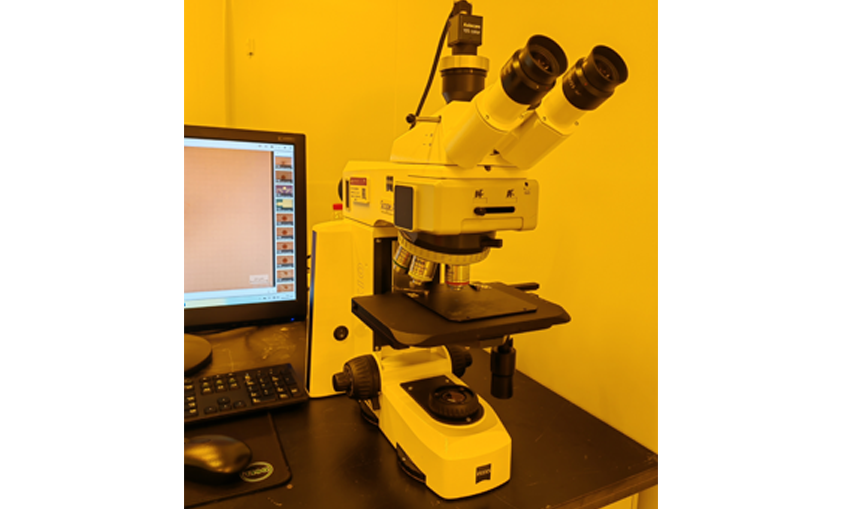
Optical microscopes enable rapid and non-destructive observation of sample surfaces, supporting macroscopic defect inspection and process monitoring. Serving as a pre-screening basis, they significantly improve the inspection efficiency in semiconductor manufacturing.
Process/Testing Capabilities
By adopting observation techniques such as bright field and dark field, the contrast can be significantly enhanced to distinguish scratches and particles on the substrate. Combined with a digital imaging system, real-time image acquisition and dimensional measurement can also be realized.
Technical Specifications
The objective lens magnifications include: 5X, 10X, 20X, 50X, 100X.
Photograph taken with 5X Objective Lens
Rotate the objective turret to switch objective lenses.
Keep the backside of the sample clean; turn the brightness down to the minimum after use.
Do not touch the equipment or operate the computer while the device is running, so as to avoid accidental shutdown or malfunction caused by misoperation.
In case of any equipment alarm, please notify the corresponding equipment engineer immediately.
2.Check if the power cord is loose and the socket works properly.
3.Please contact the equipment engineer if replacement with a spare bulb is needed.

Address: 800 Dongchuan Road, Minhang District, Shanghai 200240, China
Tel: +86 21 3420 7734
Email: [email protected]